Navigating a Complex Workflow
navigation
nested workflow
redesign
user research
financial professionals
In response to the intricate challenge of streamlining Fidelity’s Clearing & Custody Services’s process of opening multiple new financial accounts, our team embarked on a journey to enhance the user experience within the Wealthscape platform. The nature of the nested workflows posed a complexity that necessitated the creation of an intuitive navigation pattern without compromising clarity or adding unnecessary clutter.
Who is the user? What are their goals?
Think about the last time you opened a new account for a financial instrument. Perhaps it was a credit card, a bank account, a brokerage investment account, or a retirement account. The institution likely asked you about yourself and how you plan to use the account to make it functional for you.
Now, let’s say that you’re busy (gasp!). Too busy to even watch over your accounts and make constant adjustments for market performances. So you delegate your investments to a financial professional who is skilled at finding strategies to help you reach your financial goals. Then, it won’t be you opening the account, but a financial professional who is opening the account on your behalf.
Andrew Iverson
Client Investor

Andrew has too many priorities to efficiently managing all of his financial goals.
Maria Ortiz
Financial Professional

Maria is hired to manage Eric’s finances. Maria opens accounts to hold the Eric’s money and manage it towards his goals.
As advisors open Fidelity accounts for their clients on the Wealthscape platform, there are a plethora of account features that they can select from to add to the functionality of the account. For example, beneficiaries who will inherit the account, the ability to trade options on the account, or the ability to transfer funds to and from a checking account.

Background: The journey map of Andrew’s and Maria’s experiences when opening accounts. Inset: a magnified view of the steps where Andrew and Maria are exchanging information for Maria to open accounts for Andrew.
The initial release, our Minimal Viable Product (MVP), focused on simplifying the process for a single account request. Using a horizontal progress stepper, we ensured a straightforward navigation system with a maximum of 7 steps. Upon analysis, it became evident that the existing solution did not align with the common practice of financial professionals opening multiple accounts simultaneously. Metrics and meetings with financial professionals indicated that they often open accounts for an entire household at the same time, leading to shared and unique information across accounts.
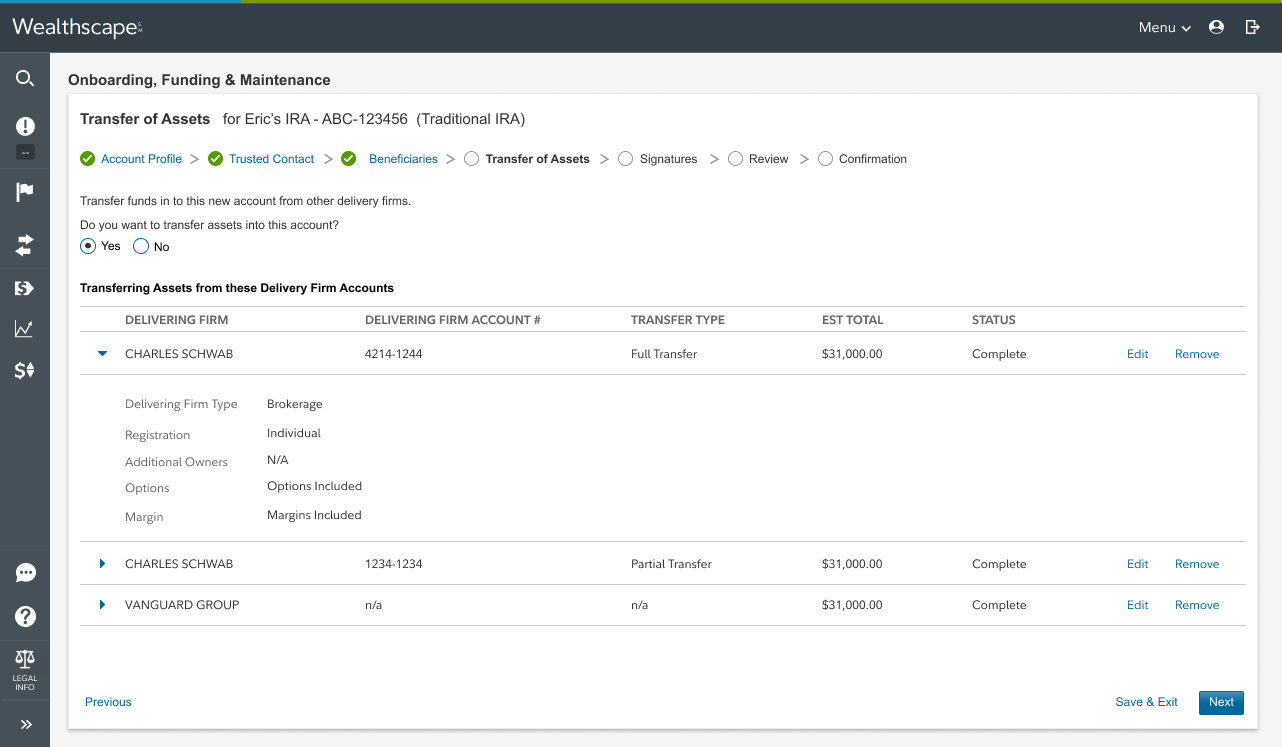
The MVP design used a horizontal workflow navigation that prioritized opening one account at a time. A privacy screen is applied to this image for sensitivity.
The Problem Statements
Financial professionals want to open all of their clients’ accounts at one time in order to reduce how much time is spent bothering them during the upfront setup phase of the relationship.
Each account comes with a lot of paperwork and features to instruct. It can be confusing to keep straight which features are complete and which ones still need to be done.
The worst outcome is having to go back to the client with additional requests or to correct something that was not done correctly the first time.
How might we enable instructing multiple accounts at the same time without causing redundant and confusing steps for the financial professional or the end investor?
The Solution Approach
Create a navigation schema that is allows financial professionals to open up to 5 accounts at a time in a clear manner. The workflow will need to communicate which account features are ready to be sent and which still need work.
Target Goals & Metrics:
Enable the financial professional to open up to 5 accounts at the same time
100% straight-through-processing on enabled features through the tool (Fidelity does not need to do manual processing to implement the account)
Financial professionals only input investor names and information once throughout the process
Financial professionals edit accounts 0 times after sending for signature due to a workflow error.
How does one open multiple accounts today?
Financial professionals open multiple accounts using paper applications all of the time. Analyzing how they approach collecting the information they need in the offline process helped us create a complementary online process.
Round 1 - Pseudo Card Sort
I used a digital closed card sort tool to track the order of how financial professionals would create the accounts with their features. This revealed that most financial professionals will only look at one account at time and then complete the workflow in a linear fashion.

Users followed 5 patterns:
Confident Sequencing - Complete Account 1 entirely, then go to Account 2
Plan & Work Backwards - Create their Plan, Complete Account 2, Complete Account 1
Late Realization - Complete Account 1, Complete Account 2, Add to Account 1
Back & Forth - Add to Account 1, Add to Account 2, Add to Account 1, etc
Meandering - Add some to Account 1, then some other amount to Account 2, and then back
Round 2 - Concept Reviews
In the second round, we reviewed visual wireframes of potential linear processes. The research focused on which pattern would best communicate the user’s position in the workflow, set expectations for the work to be done, and be the easiest to jump around the workflow.
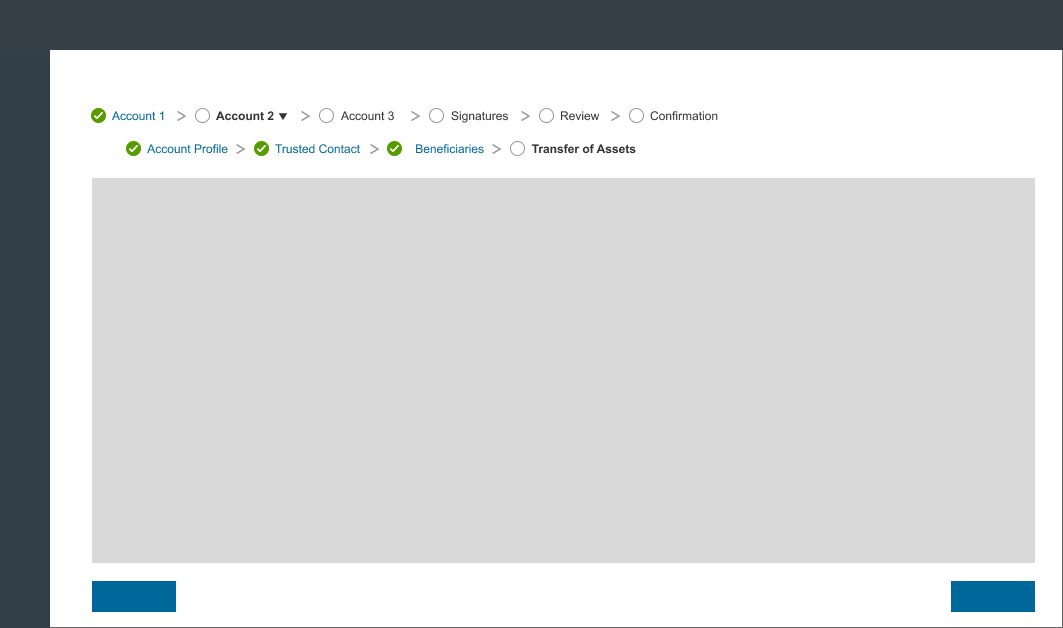
Option 1: The 2-level navigation was easiest to notice but was confusing about where the in the overall workflow the user was. Although it mimicked popular personal tax software like TurboTax, users felt surprised or blindsided that there were sub-steps and expressed confusion for how to retrace their steps.
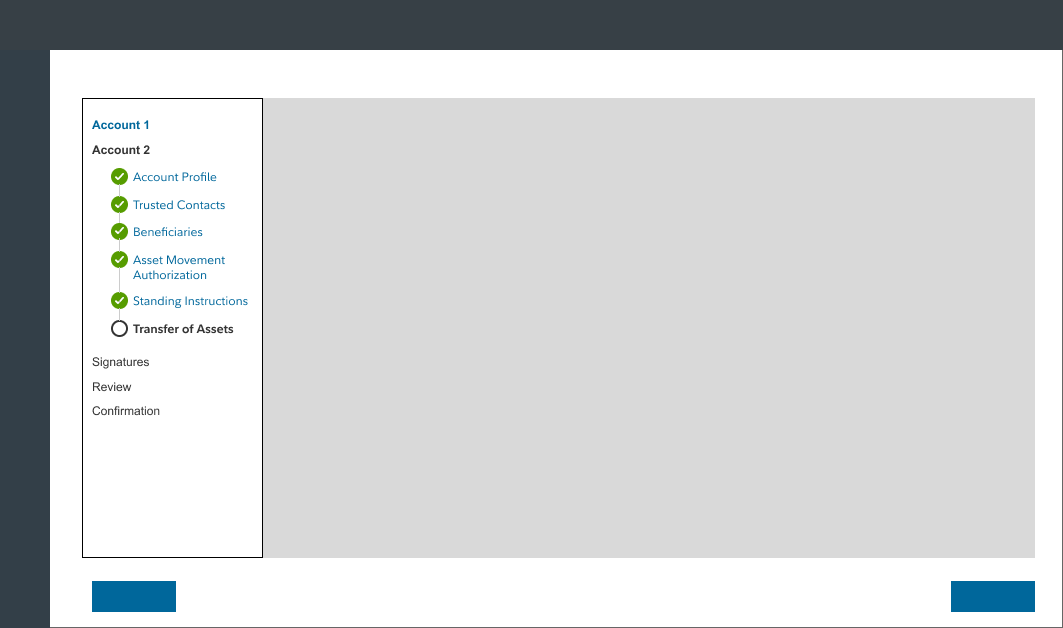
Option 2: The side panel navigation was easier to use by financial professionals. It mimicked wizards that they used in their work and personal lives. Although they liked it more, many users didn’t notice the side panel at first.
Overall, financial professionals preferred the side panel navigation. Even though it also hid sub-steps until they were needed, users weren’t upset— perhaps because they are more familiar with accordion-style interfaces. The concept reviews uncovered new user requirements as well:
Allow financial professionals to get interrupted by phone calls and meetings without losing their place in the workflow.
Investors will give information at their pace of comfort with their advisor, so allow the financial professional to add information at different steps of the workflow when they have it.
Often the operations team that supports the advisor is entering data from a CRM like Salesforce. So allow for easy integration, copy/paste and data comparison to avoid user entry errors.
The new design
With the feedback provided, we crafted the below pattern to be usable across multiple accounts, accessible, responsive, and show complex status states. In the final design phase, the navigation was moved off of the central body card onto the background placemat. This gave the card more visual priority and communicated that the navigation was a utility function.
Final reviews with internal relationship managers as user proxies added a “package name” to the navigation UI. Since professionals can save their place in their workflow and return later, they needed a way to differentiate one package from the other.
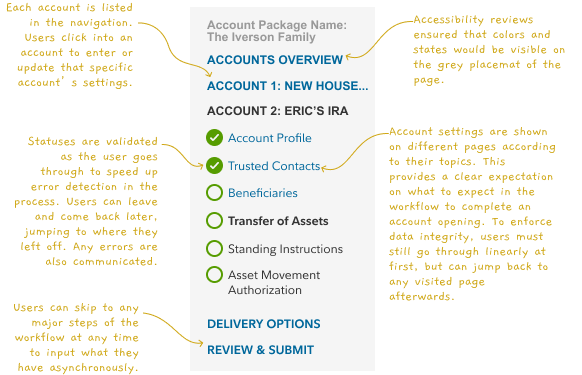
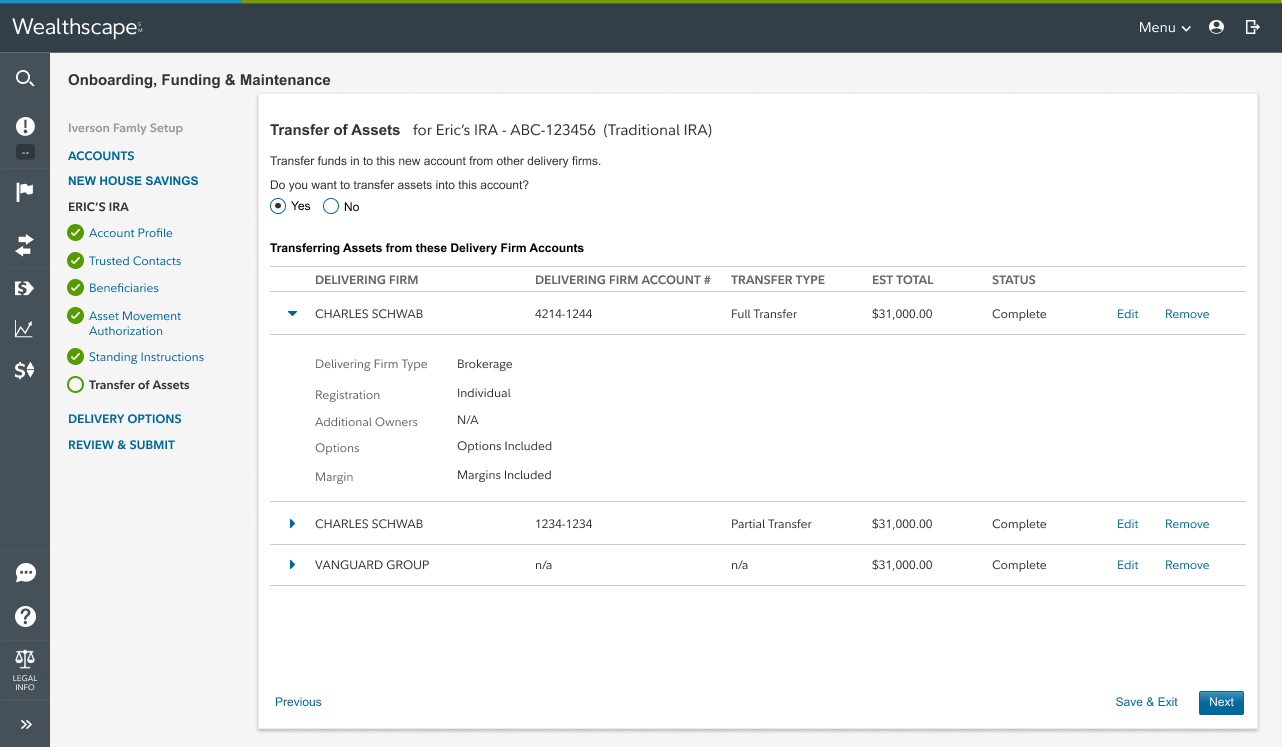
The side navigation in context. A privacy screen is applied to the image for sensitivity.
Outcomes & next steps
Financial professionals were ecstatic with the rollout of this functionality. They were able to instruct several accounts, have the client investor sign them all at once digitally and remotely, and the accounts were implemented within seconds of being signed. This side panel navigation design was easy to use, fit within their existing client relationship workflows, and was easy to learn for new associates.
Goals and Metrics Outcomes
Enabled the financial professional to open up to 5 accounts at the same time
100% straight-through-processing on new accounts
(Fidelity does not need to do manual processing to implement the account)
Financial professionals only input account owners once throughout the process
(Future iterations continued to deliver on this requirement)
0 account edits requested
15% increase in digital tool usage