Simplifying Communication with a Styleguide
internal process
process redesign
developer collaboration
desktop software
design system
style guide
UX/UI standards
I joined a development team that had just moved to a two-week Agile sprint cadence and I was challenged to include a design process that would facilitate continuous development and delivery as the sole designer. The existing process had included communication breakdowns between the developers and designers that limited the team’s sprint velocity and quality. To address this, I undertook the task of documenting a comprehensive style guide and set of standards.
Who are the users? What are their goals?
The internal-facing desktop portal application servicing our operations and customer service associates was developed over years by various designers and was hugely inconsistent from screen to screen.
Upon joining the team, I observed the symptoms of what had been a "toss it over the wall" communication style between design and development.
Developers would make unilateral changes to design when finding implementation hurdles
UX QA was often neglected and forgotten about in the process
There was a heavy reliance on redline specifications, even for minor UI enhancements
Understanding competing patterns had no history and therefore was impossible to determine the actual standard vs UI defects
Any unanticipated UX definition was seen as scope creep even if it pertained to the feature of the story
Since the team was transitioning to a fully Agile development methodology and I was brand new, this seemed like the perfect time to address the process issues and find a way to improve the communication between the design and development teams.
The breadth of the application’s various interfaces.
The Problem Statements
Each UI change was treated like a new UI build. Developers had inconsistent design instructions over the years which limited their ability to learn how to anticipate the design needs or be efficient in implementation.
As the UX Designer, I found myself spending a lot of time in meetings clarifying basic design specifications, crafting redlines to atomic levels, and trying to unpack the differences between competing design implementations.
In retrospective meetings, developers expressed frustration at what they felt was a moving target in design principles and a loss of trust in the design organization as a whole.
How might we make an efficient process to implement usable and user friendly UIs?
The Solution Approach
To streamline the design process, I decided to create a style guide website documenting the system standards and specifications. This guide would serve as a central resource for both designers and developers, minimizing the need for prolonged email exchanges, clarifications, and UX QA.
Target Goals & Metrics:
The Visual Designer only creates new icons and graphics
The UX Designer only creates redline specifications for completely new components and interfaces
Zero (0) questions about color, spacing, or fonts from the developers after design delivery
Development of UI enhancements (no net new design) can be completed within 3 days
UX QA for UI enhancements finds 0 defects
Diagnosing the cause
I reviewed the delivery process with the Visual Designers, previous UX Designers who had worked on parts of the application, and the developers themselves, and surmised that there were 4 underlying issues that needed to be addressed.
Red steps were noted as problem steps and pain points in our process.
Root Cause #1 - We designed for web, not desktop
Our company had well-documented web standards and the UX and Visual Designers often referred to those when passing over new designs. However, the product was a desktop application. Features that were typically in the control of the browser, like window chromes, zoom functions, accessibility features, and desktop configurations were unspecified. Additionally, the technology used for desktop UIs is different enough that not all web standards could be easily achieved.
Root Cause #2 - UXD was engaged myopically
Before moving to Agile with a dedicated UX Designer, the product would engage the UX Design department for specific requests. With limited scopes and funding, the designers would only be looking at one part of the application, not the whole thing. Thus, design standards, trends, and patterns weren’t applied or leveraged universally. This engagement style also explained why there was no one to ask clarifying questions to during development and why UX QA was never completed to ensure accurate development.
Root Cause #3 - Unclear roles & responsibilities
When designs and assets were provided to the development team, the designers assumed that the developers were keeping any originals as necessary in the code library for reusability. On the other hand, the developers were assuming that the designers were storing original files in a design library as the source of truth. So when no one could find the original file, finger-pointing would ensue.
Documenting a design style guide
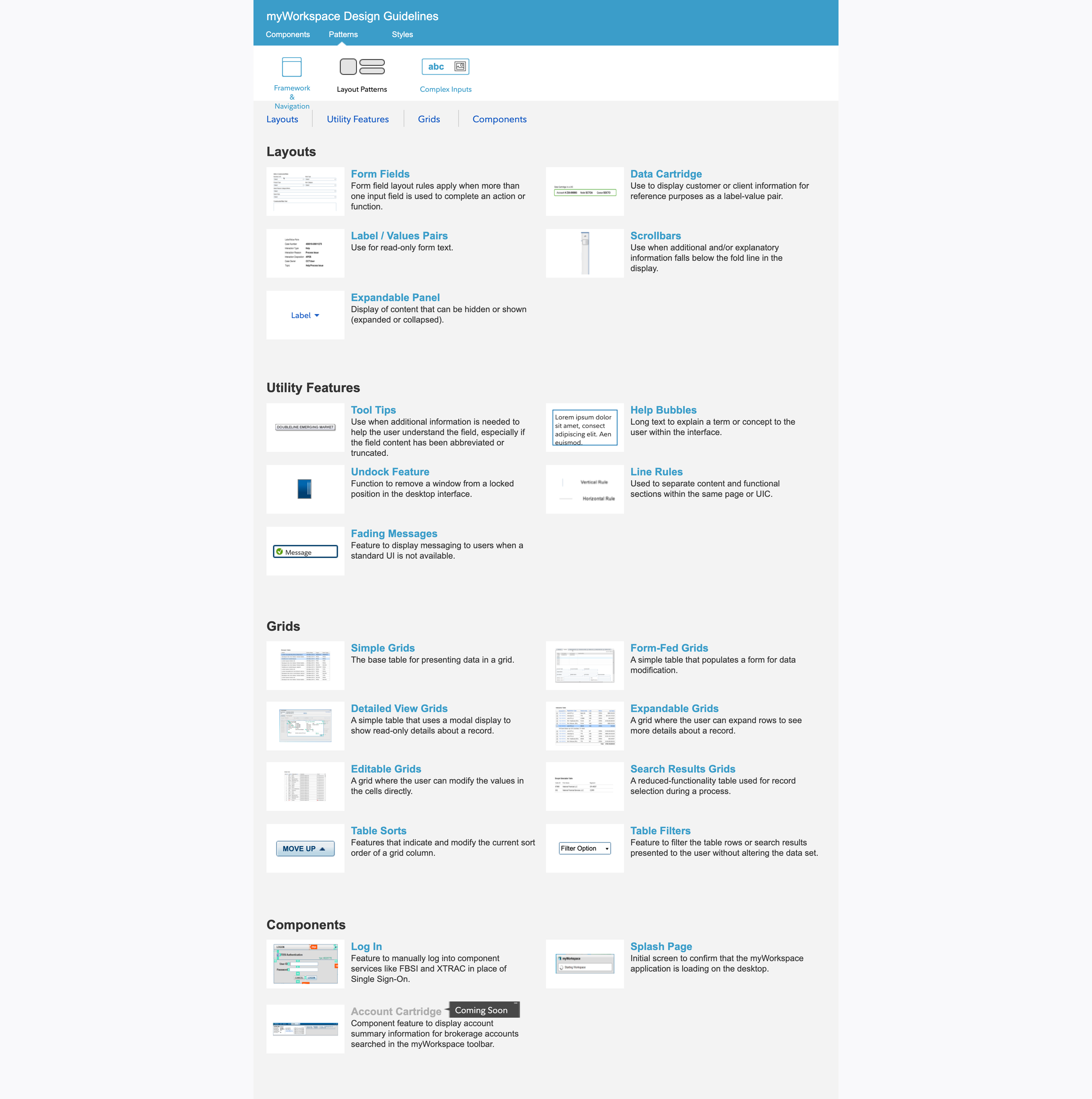
To begin, the Visual Designer did an audit of every UI in the myWorkspace application. This gave us the groundwork to identify commonalities and differences in the various interfaces. I used a modified atomic design methodology to then decide and document the rules of use, redline specifications, and interaction states for the components and patterns in the system.
In addition, the developers added libraries to their code base to store common components such as icons, text fields, data display variables. They also updated their code review standards to include assurances that developers were using the standardized components.


The outcome
The implementation of the style guide significantly accelerated the design delivery process. Developers transitioned from reliance on specifications to utilizing the resource independently, reducing design turnaround time. The Visual Designer's involvement became selective, focusing on new patterns or icons. This streamlined process resulted in more consistent interfaces for end-user associates, enhancing learnability.
With time, further enhancements were made to the style guide:
Capture where the component was being used incorrectly to add discrepancies to the backlog to be fixed
Capture interaction behaviors in the Rules of Use of components and patterns
Since the user can resize the windows of the application, document the responsive actions and appearances of patterns
Add the code base’s object name to make it easier for new developers to adopt the guide
Goals and Metrics Outcomes
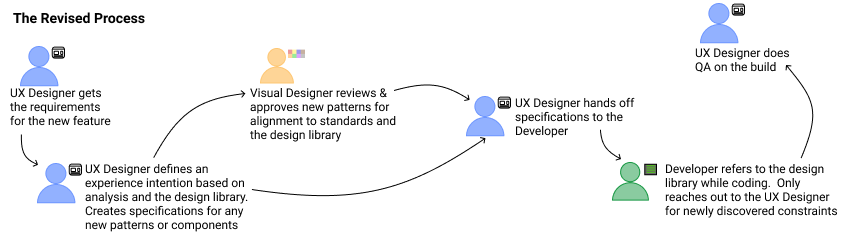
The Visual Designer only creates new icons and graphics
The UX Designer only creates redline specifications for completely new components and interfaces
Removed unnecessary steps from the typical hand-off process
Zero (0) questions about color, spacing, or fonts from the developers after design delivery
It took 2-3 sprints to break the behavior of reaching out for redline specifications but eventually the developers began using the resource themselves to answer their questions.
Minimized the time of develop UI enhancements, although not down to 3 days
75% reduction in the amount of UX defects found during the QA phase